
はじめに
こんにちは。
今日は、コーディングの補助アプリを作ってみました。
[機能1]SQLのテーブル構造を整理して表示する
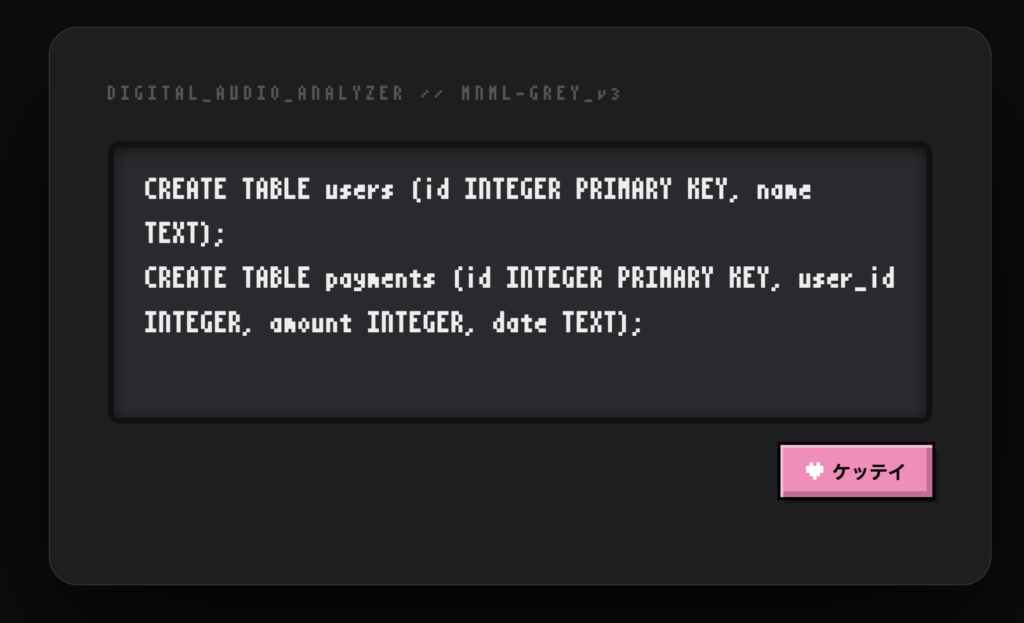
テーブル作る!
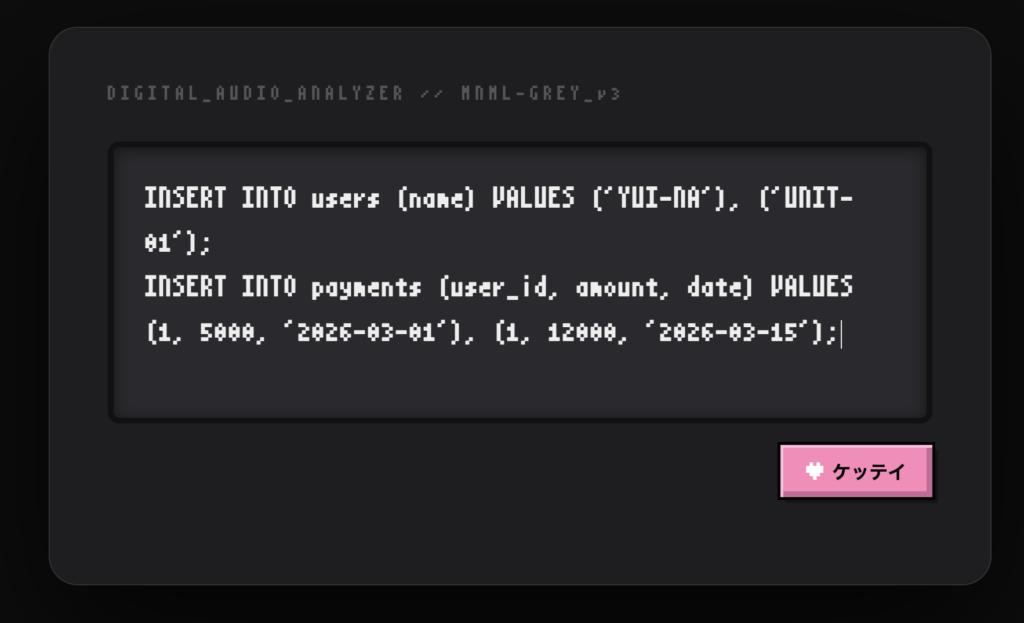
データを追加する!
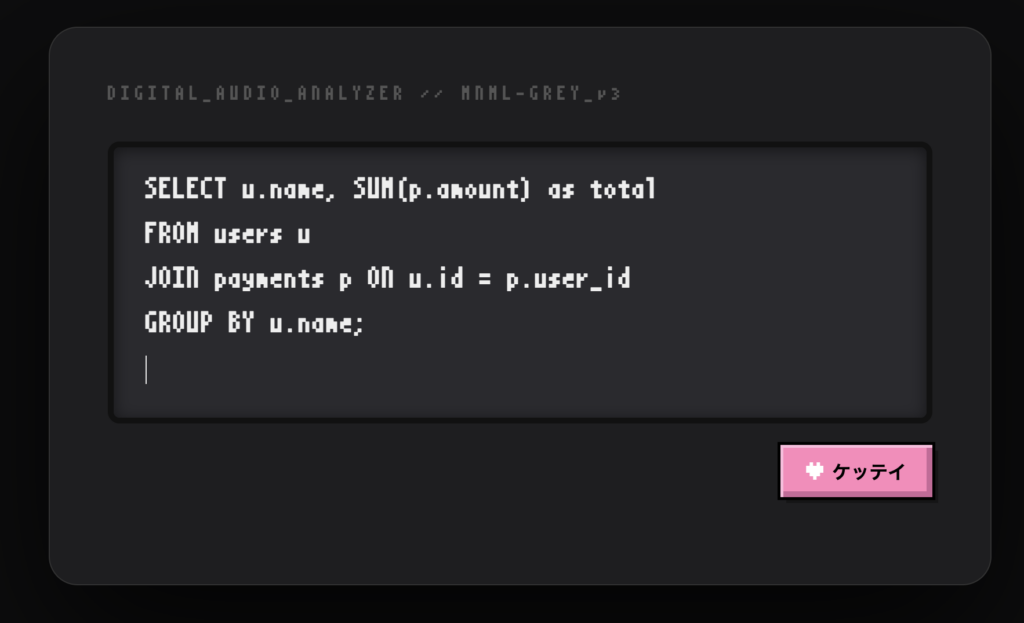
ビューを作る!
出来上がったビューを表示!
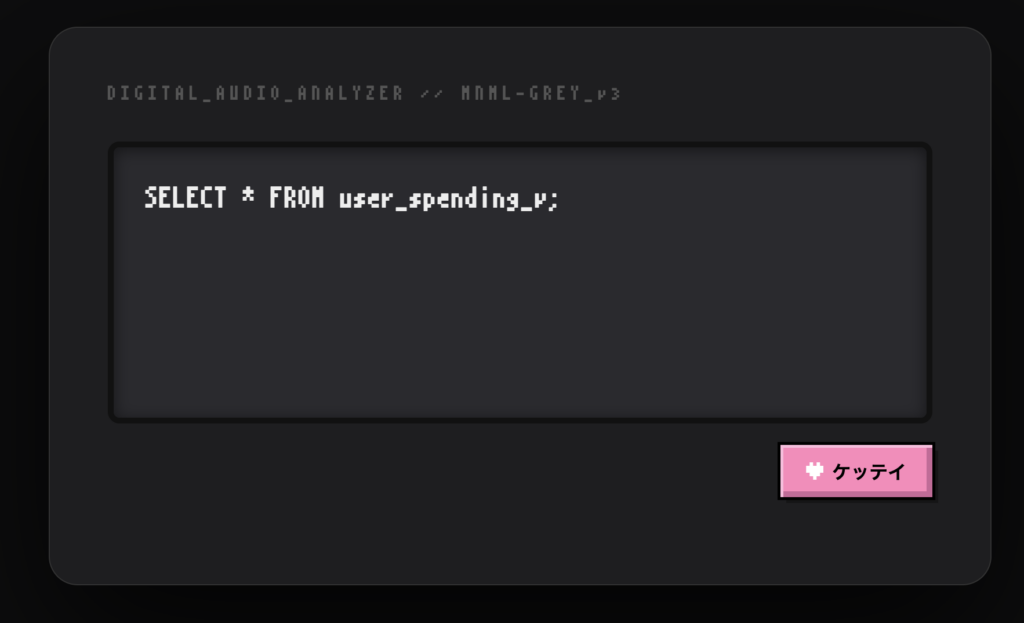
viewやテーブルの構造が一目でわかる!
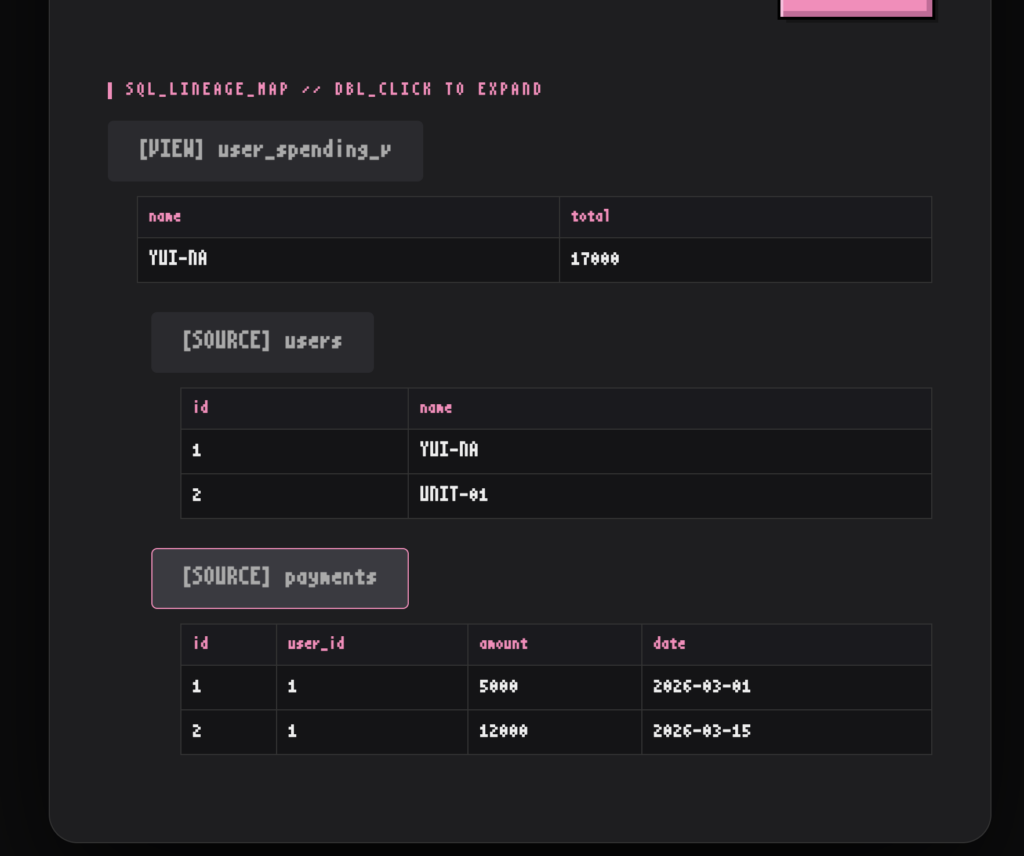
[機能2]Pythonのエラーメッセージを整理して表示する
エラーコードを入力!
ケッテイボタンを押すと・・・
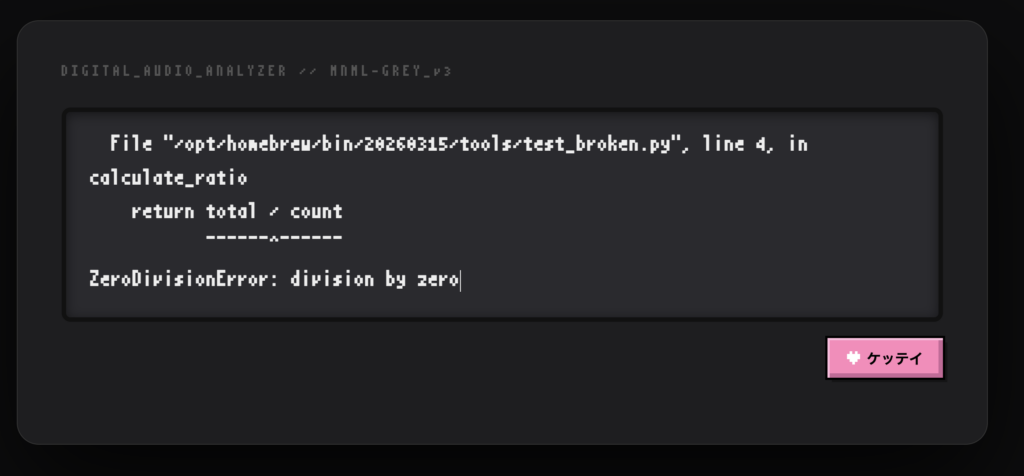
エラーの影響が出たコードの場所をピックアップ!
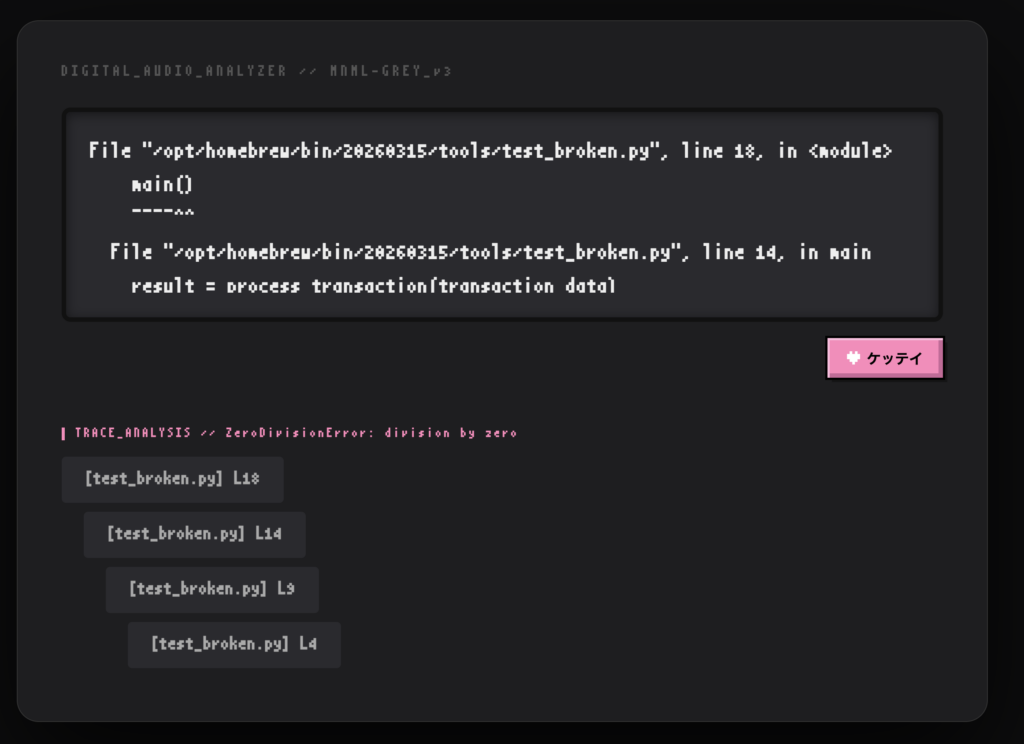
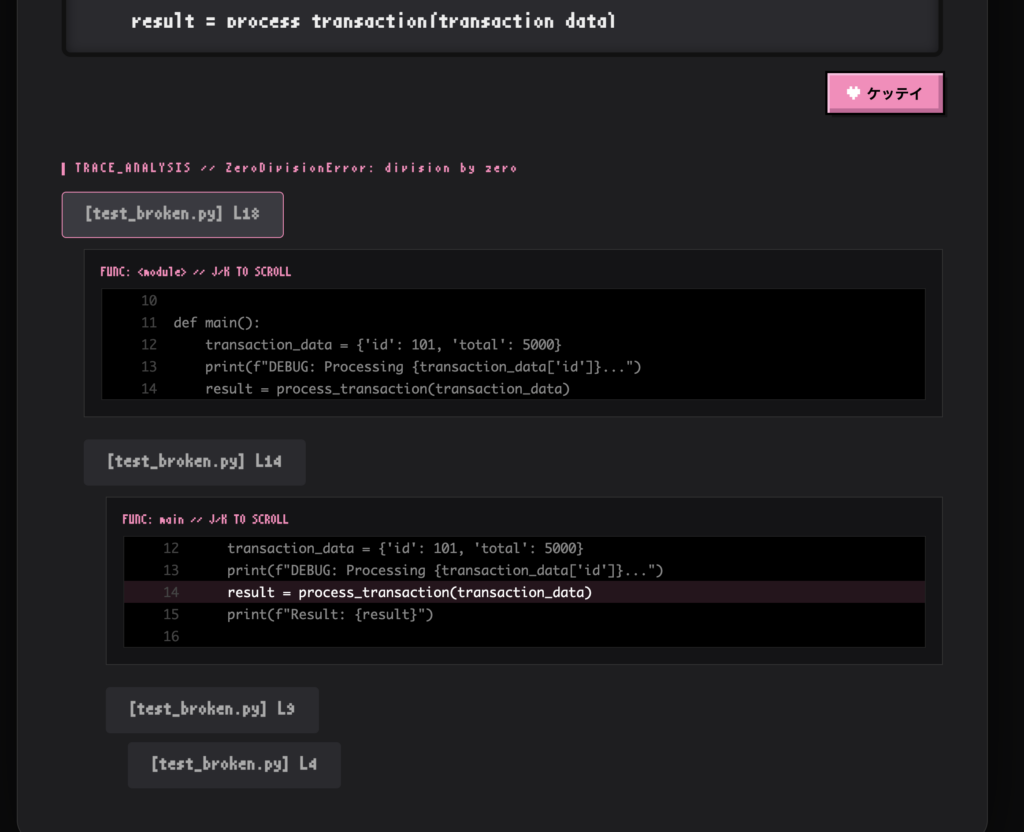
ダブルクリックで詳細を確認することもできます。(キーボードのj,kや↑↓で移動可能)
[開発環境]
- OS: macOS (M3チップ)
- 言語: Python 3.14
- 仮想環境: venv
- DB: SQLite
- ツール管理: Homebrew (tree, Pythonなどのインストールに使用)
[ディレクトリ構造]
非常にややこしいディレクトリ名にしてしまいました。。。🙇♀️🙇♀️🙇♀️
・view_sql:全体の管理
・error_analyze:処理の詳細を管理
※error_analyzeという名前ですが、SQLの可視化の処理もここで書いてます。
tree -L 2
.
├── README.md
├── config
│   ├── __init__.py
│   ├── __pycache__
│   ├── asgi.py
│   ├── settings.py
│   ├── urls.py
│   └── wsgi.py
├── db.sqlite3
├── error_analyze ←コードのエラー分析とSQL可視化の具体的な処理内容を管理
│   ├── __init__.py
│   ├── __pycache__
│   ├── admin.py
│   ├── apps.py
│   ├── migrations
│   ├── models.py
│   ├── templates
│   ├── tests.py
│   ├── urls.py
│   └── views.py
├── kakeibo.db
├── manage.py
├── memo.md
├── tools
│   └── test_broken.py
├── venv
│   ├── bin
│   ├── include
│   ├── lib
│   └── pyvenv.cfg
└── view_sql ←どのアプリを動かすか、どのDBを使うか、など全体ルールを管理します。
    ├── __init__.py
    ├── __pycache__
    ├── admin.py
    ├── asgi.py
    ├── migrations
    ├── models.py
    ├── settings.py
    ├── tests.py
    ├── urls.py
    ├── views.py
    └── wsgi.py
全体のコードはこちらにあります。
環境を作る
環境構築
# 仮想環境作成
python3 -m venv venv
# 有効化
source venv/bin/activate
# ライブラリのインストール
pip install django
# インストールできたか確認
python -m django --version
>>6.0.3
# プロジェクト作成
django-admin startproject config .
# アプリ作成
python manage.py startapp myapp
# マイグレーションの実行
python manage.py migrate
# 開発用サーバーの起動
python manage.py runserver
[メモ]python3 -m venv venvについて
Python3:python呼び出し
-m venv:標準ライブラリのvenvをモジュール(-m)として実行
venv:ライブラリ管理用ディレクトリ作成

# バージョンを指定する(Version3.9の場合)
python3.9 -m venv venv-3.9
[メモ]manage.pyについて
setdefaultメソッドを呼び出す
今回は、第1引数のDJANGO_SETTINGS_MODULEという環境変数は特に何も設定していません。
第2引数のconfig.settingsに設定しています。
manage.py
os.environ.setdefault('DJANGO_SETTINGS_MODULE', 'config.settings')os.py
key(DJANGO_SETTINGS_MODULE)がなければ,value(config.settings)をkeyに設定します。
    def setdefault(self, key, value):
        if key not in self:
            self[key] = value
        return self[key]
manage.py
続いて、execute_from_command_lineメソッドを呼び出します。
from django.core.management import execute_from_command_line

execute_from_command_line(sys.argv)
management>__init__.pyi
pyiファイルなので、中身が見えませんでした。
def execute_from_command_line(argv: list[str] | None = ...) -> None: ...ブラウザで検索「github django」します。
(ブログにリンクを埋め込みできなかったので、ベタ貼りで失礼します><)
https://github.com/django/django/blob/6b90f8a8d6994dc62cd91dde911fe56ec3389494/django/core/management/init.py#L440django/core/management/__init__.py
ManagementUtilityクラスを呼び出していますね。
def execute_from_command_line(argv=None):
"""Run a ManagementUtility."""
utility = ManagementUtility(argv)
utility.execute()
__init__.pyのManagementUtilityクラス
引数を自分のプロパティとして保持します。
def __init__(self, argv=None):
        self.argv = argv or sys.argv[:]
        self.prog_name = os.path.basename(self.argv[0])
        if self.prog_name == "__main__.py":
            self.prog_name = "python -m django"
        self.settings_exception = None
サブコマンド(命令)を抽出します。
def execute(self):
        try:
            subcommand = self.argv[1]
        except IndexError:
subcommand = "help" # Display help if no arguments were given.self.argv[2:](サブコマンド以降の引数すべて)を解析し、もし --settings があればそれを適用します。
parser = CommandParser(
            prog=self.prog_name,
            usage="%(prog)s subcommand [options] [args]",
            add_help=False,
            allow_abbrev=False,
        )
        parser.add_argument("--settings")
        parser.add_argument("--pythonpath")
        parser.add_argument("args", nargs="*")
options, args = parser.parse_known_args(self.argv[2:])
そして、最終的なコマンド実行へ引き継ぎます。
self.fetch_command(subcommand).run_from_argv(self.argv)解説
◾️error_analyze>views.py
lineage関数:SQLのテーブルやビューどのテーブルからデータを持ってきているのか調べます。
def get_lineage(cur, table_name, depth=0):
    lineage_data = []
    indent = depth * 30
    cur.execute("SELECT type, sql FROM sqlite_master WHERE LOWER(name)=LOWER(?)", (table_name,))
    info = cur.fetchone()
1.実体のテーブルなのかビューなのか、DB管理情報のsqlite_masterから調べます。
    columns, sample_data = [], []

    try:
        cur.execute(f"PRAGMA table_info({table_name})")
        columns = [col[1] for col in cur.fetchall()]
        cur.execute(f"SELECT * FROM {table_name} LIMIT 5")
        sample_data = [list(row) for row in cur.fetchall()]
    except: pass
2.レコードの情報を取得します。
node_data = {'name': table_name, 'type': 'SOURCE', 'indent': indent, 'columns': columns, 'data': sample_data}3.取得した情報を辞書型で管理します。
if info:
        if info[0].upper() == 'VIEW':
            node_data['type'] = 'VIEW'
            lineage_data.append(node_data)
            view_sql = info[1]
            # 正規表現を強化: FROMやJOINの後の単語を抽出
            # カンマ区切りやサブクエリ、エイリアスに対応
            found_tables = re.findall(r"(?:FROM|JOIN)\s+([a-zA-Z0-9_]+)", view_sql, re.IGNORECASE)
            # 重複排除と予約語の除外
            for p in sorted(set(found_tables), key=found_tables.index):
                if p.upper() not in ["SELECT", "AS", "WHERE", "GROUP", "ORDER", "LEFT", "RIGHT", "INNER", "OUTER"]:
                    lineage_data.extend(get_lineage(cur, p, depth + 1))
        else:
            lineage_data.append(node_data)
    return lineage_data
4.関数の最初あたりで作成したリスト(lineage_data)に全てのデータを追加していきます。
lineage_data.extend(get_lineage(cur, p, depth + 1))とありますが、再起処理を使うことで、ビューどのテーブルからデータを持ってきているか、調べることができます。
index関数:ユーザーが入力したテキスト(以下、入力データと呼ぶ)の内容を見て、SQLとトレースバッグのどちらかを判断し、適切な処理に振り分けます。
viz_result, sql_result, status_message = None, None, None
raw_input = request.POST.get("error_log", "") if request.method == "POST" else ""
db_path = os.path.join(os.path.dirname(os.path.dirname(os.path.abspath(__file__))), 'kakeibo.db')
raw_input:入力データが送られてきた時のみ、処理します。エラーログが送られてきた時は空で返します。
db_path:DBがある場所を特定します。
if request.method == "POST" and raw_input:
  clean_input = raw_input.strip()
    upper_input = clean_input.upper()
データを全て大文字に直します。
if any(upper_input.startswith(cmd) for cmd in ["CREATE", "DROP", "INSERT", "DELETE", "UPDATE"]):
   with sqlite3.connect(db_path) as conn:
      conn.executescript(raw_input)
入力データに”CREATE”, “DROP”, “INSERT”, “DELETE”, “UPDATE”のどれかが含まれている場合、
dbに接続します。
target_tables = re.findall(r"FROM\s+([a-zA-Z0-9_]+)", clean_input, re.IGNORECASE)ここから、SQL可視化とエラー分析で処理が分かれていきます。
まずは、SQL可視化の方からです。
入力データがSELECTだった場合、SELECT文からテーブル名を抽出します。
lineage_tree.extend(get_lineage(cur, name))
sql_result = {'lineage': lineage_tree}
そして先ほど紹介したget_lineage関数を呼び出します。
結果は、sql_resultという変数に保持されます。
return render(request, 'analyzer/index.html', {
   'viz_result': viz_result, 'sql_result': sql_result,
   'status_message': status_message, 'raw_error': raw_input
})
最後に、sql_resultをHTMLテンプレートに流し込み、最終的な画面としてユーザーに届けています。
続いてエラー分析の方ですね。
まず、エラーログによくある「ファイル名、行番号、関数名」のパターンを抽出します。
trace_steps = re.findall(r'File\s+"(.+?)",\s*line\s*(\d+),\s*in\s*(.+)', raw_input)if trace_steps:
steps = []
for i, (path, line, func) in enumerate(trace_steps):
line_num = int(line)
code_all = []もし一つでも「ファイル名と行番号のセット」が見つかったら分析を進めます。
何も見つからなければ、スルーされます。
if os.path.exists(path):
with open(path, 'r', encoding='utf-8') as f:
for idx, text in enumerate(f.readlines()):
curr = idx + 1
code_all.append({'num': curr, 'text': text.rstrip(), 'is_target': (curr == line_num)})
else:
code_all = [{'num': line_num, 'text': "/* FILE_NOT_FOUND */", 'is_target': True}]表示用データの作成を行います。
'is_target': (curr == line_num)ここでは、いま読み込んでいる行番号とエラーログに書かれていた行番号が一致するかを判定し、TrueかFalseを記録します。
code_all = [{'num': line_num, 'text': "/* FILE_NOT_FOUND */", 'is_target': True}]ファイルが見つからなければ、”/* FILE_NOT_FOUND */”と表示します。
except:
code_all = [{'num': line_num, 'text': "/* LOAD_ERROR */", 'is_target': True}]
steps.append({'file': os.path.basename(path), 'line': line, 'func': func, 'indent': i * 20, 'code_all': code_all, 'target_line': line_num})code_allにエラーの内容を入れ込みます。
’text’には、本物のエラーコードの代わりに、/* LOAD_ERROR */ という短いテキストを入れます。
‘num’にはline_num は保持し、’is_target ‘も True にすることで、エラーが起こった箇所の情報は保持します。
結果、画面にはコードは出ないが、「何行目でエラーだったか」という事実だけは表示されます。
return render(request, 'analyzer/index.html', {
'viz_result': viz_result, 'sql_result': sql_result,
'status_message': status_message, 'raw_error': raw_input
})SQL可視化と同じようにHTMLテンプレートに流し込み、最終的な画面としてユーザーに届けます。
おわりに
周辺設定(フロントエンドや urls.py / settings.py 等)の修正箇所については、今回は説明を割愛します。
Djangoの動作原理については、こちらの解説記事で紹介していますので、ぜひチェックしてみてください。

ありがとうございました!
今回登場したコード全体
config>asgi.py
"""
ASGI config for config project.
It exposes the ASGI callable as a module-level variable named ``application``.
For more information on this file, see
https://docs.djangoproject.com/en/6.0/howto/deployment/asgi/
"""
import os
from django.core.asgi import get_asgi_application
os.environ.setdefault('DJANGO_SETTINGS_MODULE', 'config.settings')
application = get_asgi_application()
config>settings.py
"""
Django settings for config project.
Generated by 'django-admin startproject' using Django 6.0.2.
For more information on this file, see
https://docs.djangoproject.com/en/6.0/topics/settings/
For the full list of settings and their values, see

 docs.djangoproject.com
"""
from pathlib import Path
# Build paths inside the project like this: BASE_DIR / 'subdir'.
BASE_DIR = Path(__file__).resolve().parent.parent
# Quick-start development settings - unsuitable for production
# See https://docs.djangoproject.com/en/6.0/howto/deployment/checklist/
# SECURITY WARNING: keep the secret key used in production secret!
SECRET_KEY = '秘密'
# SECURITY WARNING: don't run with debug turned on in production!
DEBUG = True
ALLOWED_HOSTS = []
# Application definition
INSTALLED_APPS = [
'django.contrib.admin',
'django.contrib.auth',
'django.contrib.contenttypes',
'django.contrib.sessions',
'django.contrib.messages',
'django.contrib.staticfiles',
'error_analyze',
]
MIDDLEWARE = [
'django.middleware.security.SecurityMiddleware',
'django.contrib.sessions.middleware.SessionMiddleware',
'django.middleware.common.CommonMiddleware',
'django.middleware.csrf.CsrfViewMiddleware',
'django.contrib.auth.middleware.AuthenticationMiddleware',
'django.contrib.messages.middleware.MessageMiddleware',
'django.middleware.clickjacking.XFrameOptionsMiddleware',
]
ROOT_URLCONF = 'config.urls'
TEMPLATES = [
{
'BACKEND': 'django.template.backends.django.DjangoTemplates',
'DIRS': [],
'APP_DIRS': True,
'OPTIONS': {
'context_processors': [
'django.template.context_processors.request',
'django.contrib.auth.context_processors.auth',
'django.contrib.messages.context_processors.messages',
],
},
},
]
WSGI_APPLICATION = 'config.wsgi.application'
# Database
# https://docs.djangoproject.com/en/6.0/ref/settings/#databases
DATABASES = {
'default': {
'ENGINE': 'django.db.backends.sqlite3',
'NAME': BASE_DIR / 'db.sqlite3',
}
}
# Password validation
# https://docs.djangoproject.com/en/6.0/ref/settings/#auth-password-validators
AUTH_PASSWORD_VALIDATORS = [
{
'NAME': 'django.contrib.auth.password_validation.UserAttributeSimilarityValidator',
},
{
'NAME': 'django.contrib.auth.password_validation.MinimumLengthValidator',
},
{
'NAME': 'django.contrib.auth.password_validation.CommonPasswordValidator',
},
{
'NAME': 'django.contrib.auth.password_validation.NumericPasswordValidator',
},
]
# Internationalization
# https://docs.djangoproject.com/en/6.0/topics/i18n/
LANGUAGE_CODE = 'en-us'
TIME_ZONE = 'UTC'
USE_I18N = True
USE_TZ = True
# Static files (CSS, JavaScript, Images)
# https://docs.djangoproject.com/en/6.0/howto/static-files/
STATIC_URL = 'static/'
docs.djangoproject.com
"""
from pathlib import Path
# Build paths inside the project like this: BASE_DIR / 'subdir'.
BASE_DIR = Path(__file__).resolve().parent.parent
# Quick-start development settings - unsuitable for production
# See https://docs.djangoproject.com/en/6.0/howto/deployment/checklist/
# SECURITY WARNING: keep the secret key used in production secret!
SECRET_KEY = '秘密'
# SECURITY WARNING: don't run with debug turned on in production!
DEBUG = True
ALLOWED_HOSTS = []
# Application definition
INSTALLED_APPS = [
'django.contrib.admin',
'django.contrib.auth',
'django.contrib.contenttypes',
'django.contrib.sessions',
'django.contrib.messages',
'django.contrib.staticfiles',
'error_analyze',
]
MIDDLEWARE = [
'django.middleware.security.SecurityMiddleware',
'django.contrib.sessions.middleware.SessionMiddleware',
'django.middleware.common.CommonMiddleware',
'django.middleware.csrf.CsrfViewMiddleware',
'django.contrib.auth.middleware.AuthenticationMiddleware',
'django.contrib.messages.middleware.MessageMiddleware',
'django.middleware.clickjacking.XFrameOptionsMiddleware',
]
ROOT_URLCONF = 'config.urls'
TEMPLATES = [
{
'BACKEND': 'django.template.backends.django.DjangoTemplates',
'DIRS': [],
'APP_DIRS': True,
'OPTIONS': {
'context_processors': [
'django.template.context_processors.request',
'django.contrib.auth.context_processors.auth',
'django.contrib.messages.context_processors.messages',
],
},
},
]
WSGI_APPLICATION = 'config.wsgi.application'
# Database
# https://docs.djangoproject.com/en/6.0/ref/settings/#databases
DATABASES = {
'default': {
'ENGINE': 'django.db.backends.sqlite3',
'NAME': BASE_DIR / 'db.sqlite3',
}
}
# Password validation
# https://docs.djangoproject.com/en/6.0/ref/settings/#auth-password-validators
AUTH_PASSWORD_VALIDATORS = [
{
'NAME': 'django.contrib.auth.password_validation.UserAttributeSimilarityValidator',
},
{
'NAME': 'django.contrib.auth.password_validation.MinimumLengthValidator',
},
{
'NAME': 'django.contrib.auth.password_validation.CommonPasswordValidator',
},
{
'NAME': 'django.contrib.auth.password_validation.NumericPasswordValidator',
},
]
# Internationalization
# https://docs.djangoproject.com/en/6.0/topics/i18n/
LANGUAGE_CODE = 'en-us'
TIME_ZONE = 'UTC'
USE_I18N = True
USE_TZ = True
# Static files (CSS, JavaScript, Images)
# https://docs.djangoproject.com/en/6.0/howto/static-files/
STATIC_URL = 'static/'
urls.py
"""
URL configuration for config project.
The `urlpatterns` list routes URLs to views. For more information please see:
https://docs.djangoproject.com/en/6.0/topics/http/urls/
Examples:
Function views
1. Add an import: from my_app import views
2. Add a URL to urlpatterns: path('', views.home, name='home')
Class-based views
1. Add an import: from other_app.views import Home
2. Add a URL to urlpatterns: path('', Home.as_view(), name='home')
Including another URLconf
1. Import the include() function: from django.urls import include, path
2. Add a URL to urlpatterns: path('blog/', include('blog.urls'))
"""
from django.contrib import admin
from django.urls import path, include
urlpatterns = [
path('admin/', admin.site.urls),
path('', include('error_analyze.urls')),
]
wsgi.py
"""
WSGI config for config project.
It exposes the WSGI callable as a module-level variable named ``application``.
For more information on this file, see
https://docs.djangoproject.com/en/6.0/howto/deployment/wsgi/
"""
import os
from django.core.wsgi import get_wsgi_application
os.environ.setdefault('DJANGO_SETTINGS_MODULE', 'config.settings')
application = get_wsgi_application()
error_analyze>templates>index.html
<!DOCTYPE html>
<html lang="ja">
<head>
<meta charset="UTF-8">
<title>AUDIO_ANALYZER // MNML-GREY_v3</title>
<style>
@font-face { font-family: 'MisakiGothic'; src: url('https://cdn.leafscape.be/misaki/misaki_gothic_web.woff2') format('woff2'); }
:root {
--base: #1E1E20; --input-bg: #2A2A2E; --pink: #FF88BB; --text: #AAAAAA;
--code-bg: #141416; --track-focus: #3A3A40;
--btn-main: #FF88BB; --btn-shadow: #CC6699; --btn-light: #FFBBDD;
}
body { font-family: 'MisakiGothic', sans-serif; background: #0D0D0F; color: var(--text); margin: 0; padding: 40px; image-rendering: pixelated; }
.container {
max-width: 800px; margin: 0 auto; background: var(--base); padding: 40px;
border-radius: 20px; border: 1px solid #333; position: relative;
box-shadow: 0 40px 100px rgba(0,0,0,0.8);
display: flex; flex-direction: column;
}
.header-text { font-size: 0.8rem; color: #555; letter-spacing: 3px; margin-bottom: 25px; }
.status-msg {
font-size: 0.7rem; color: var(--pink); margin-bottom: 10px;
letter-spacing: 1px; border-bottom: 1px solid #333; display: inline-block; padding-bottom: 2px;
}
.lcd-panel {
background: var(--input-bg); border: 4px solid #111; padding: 20px;
border-radius: 8px; margin-bottom: 15px;
box-shadow: inset 0 2px 10px rgba(0,0,0,0.5);
}
textarea {
width: 100%; height: 140px; background: transparent; border: none;
font-family: 'MisakiGothic'; font-size: 1.2rem; color: #EEE;
outline: none; resize: none; line-height: 1.6;
}
.btn-wrapper { display: flex; justify-content: flex-end; width: 100%; margin-bottom: 20px; }
.analyze-btn {
width: 105px; height: 36px;
background: var(--btn-main); border: none; cursor: pointer;
display: flex; align-items: center; justify-content: center; gap: 6px;
box-shadow: 0 0 0 2px #000, inset 2px 2px 0 var(--btn-light), inset -4px -4px 0 var(--btn-shadow), 4px 4px 0 rgba(0,0,0,0.3);
transition: all 0.05s; outline: none;
}
.analyze-btn:active {
transform: translate(2px, 2px);
box-shadow: 0 0 0 2px #000, inset 4px 4px 0 var(--btn-shadow), inset -2px -2px 0 var(--btn-light), 0 0 0 rgba(0,0,0,0);
}
.heart {
width: 12px; height: 12px; background: #FFF;
clip-path: polygon(0 20%, 20% 20%, 20% 0, 40% 0, 40% 20%, 60% 20%, 60% 0, 80% 0, 80% 20%, 100% 20%, 100% 60%, 80% 60%, 80% 80%, 60% 80%, 60% 100%, 40% 100%, 40% 80%, 20% 80%, 20% 60%, 0 60%);
}
.btn-label { font-size: 0.8rem; color: #000; font-weight: bold; line-height: 1; margin-top: 2px; }
.track-list-title { font-size: 0.7rem; color: var(--pink); border-left: 3px solid var(--pink); padding-left: 10px; margin: 25px 0 15px; letter-spacing: 2px; }
.track-item {
background: var(--input-bg); padding: 12px 20px; margin-bottom: 8px; border-radius: 4px;
cursor: pointer; font-size: 1rem; width: fit-content; outline: none; border: 1px solid transparent;
user-select: none;
}
.track-item:focus { background: var(--track-focus); border: 1px solid var(--pink); }
.track-detail { background: var(--code-bg); border: 1px solid #333; margin: 10px 0 20px 20px; padding: 15px; display: none; }
.viewport { height: 100px; overflow: hidden; position: relative; background: #000; border: 1px solid #222; }
.code-container { position: absolute; width: 100%; transition: transform 0.1s ease-out; }
.code-line { height: 20px; line-height: 20px; display: flex; font-family: monospace; font-size: 0.9rem; padding: 0 10px; }
.line-num { color: #444; width: 40px; text-align: right; margin-right: 15px; user-select: none; }
.line-text { color: #888; white-space: pre; }
.target-line { background: rgba(255, 136, 187, 0.15); color: #fff; }
.target-line .line-text { color: #fff; }
/* SQL解析用テーブル */
.sql-table-container { display: none; margin: 10px 0 20px 20px; }
.sql-table { width: 100%; border-collapse: collapse; background: var(--code-bg); font-size: 0.85rem; }
.sql-table th, .sql-table td { border: 1px solid #333; padding: 8px; text-align: left; }
.sql-table th { color: var(--pink); background: #1A1A1E; font-size: 0.7rem; }
.sql-table td { color: #EEE; }
</style>
</head>
<body>
<div class="container">
<div class="header-text">DIGITAL_AUDIO_ANALYZER // MNML-GREY_v3</div>
<form method="post">
{% csrf_token %}
{% if status_message %}<div class="status-msg">STATUS: {{ status_message }}</div>{% endif %}
<div class="lcd-panel">
<textarea name="error_log" placeholder="READY_">{{ raw_error }}</textarea>
</div>
<div class="btn-wrapper">
<button type="submit" class="analyze-btn">
<div class="heart"></div>
<div class="btn-label">ケッテイ</div>
</button>
</div>
</form>
{% if viz_result %}
<div class="track-list-title">TRACE_ANALYSIS // {{ viz_result.name }}</div>
{% for step in viz_result.steps %}
<div style="margin-left: {{ step.indent }}px;">
<div class="track-item" tabindex="0" onclick="toggleTrace(this, {{ forloop.counter }}, {{ step.target_line }})">
<strong>[{{ step.file }}] L{{ step.line }}</strong>
</div>
<div class="track-detail" id="trace-{{ forloop.counter }}">
<div style="font-size: 0.7rem; color: var(--pink); margin-bottom: 8px;">FUNC: {{ step.func }} // J/K TO SCROLL</div>
<div class="viewport">
<div class="code-container" id="container-{{ forloop.counter }}" data-offset="0">
{% for line in step.code_all %}
<div class="code-line {% if line.is_target %}target-line{% endif %}">
<span class="line-num">{{ line.num }}</span><span class="line-text">{{ line.text }}</span>
</div>
{% endfor %}
</div>
</div>
</div>
</div>
{% endfor %}
{% endif %}
{% if sql_result %}
<div class="track-list-title">SQL_LINEAGE_MAP // DBL_CLICK TO EXPAND</div>
{% if sql_result.error %}
<div class="status-msg">ERROR: {{ sql_result.error }}</div>
{% else %}
{% for item in sql_result.lineage %}
<div style="margin-left: {{ item.indent }}px;">
<div class="track-item" tabindex="0" ondblclick="toggleSql(this, {{ forloop.counter }})">
<strong>[{{ item.type }}] {{ item.name }}</strong>
</div>
<div class="sql-table-container" id="sql-{{ forloop.counter }}">
<table class="sql-table">
<thead><tr>{% for col in item.columns %}<th>{{ col }}</th>{% endfor %}</tr></thead>
<tbody>
{% for row in item.data %}
<tr>{% for val in row %}<td>{{ val }}</td>{% endfor %}</tr>
{% empty %}
<tr><td colspan="{{ item.columns|length }}" style="text-align:center; color:#555;">NO_DATA</td></tr>
{% endfor %}
</tbody>
</table>
</div>
</div>
{% endfor %}
{% endif %}
{% endif %}
</div>
<script>
const LINE_H = 20; let lastActive = null;
// Pythonトレースの表示切替 (シングルクリック)
function toggleTrace(el, id, targetLine) {
const detail = document.getElementById('trace-' + id), container = document.getElementById('container-' + id);
const isOpening = (detail.style.display === 'none' || detail.style.display === '');
detail.style.display = isOpening ? 'block' : 'none';
if (isOpening) {
lastActive = el; el.focus();
updateScroll(container, -((targetLine - 3) * LINE_H));
}
}
function toggleSql(el, id) {
const container = document.getElementById('sql-' + id);
container.style.display = (container.style.display === 'none' || container.style.display === '') ? 'block' : 'none';
}
window.addEventListener('keydown', function(e) {
if (e.target.tagName === 'TEXTAREA' || !lastActive) return;
const detail = lastActive.parentElement.querySelector('.track-detail');
if (!detail || detail.style.display === 'none') return;
const container = detail.querySelector('.code-container');
let current = parseInt(container.getAttribute('data-offset') || 0);
if (e.key === 'j' || e.key === 'ArrowDown') { updateScroll(container, current - LINE_H); e.preventDefault(); }
else if (e.key === 'k' || e.key === 'ArrowUp') { updateScroll(container, current + LINE_H); e.preventDefault(); }
}, true);
function updateScroll(c, o) { c.style.transform = `translateY(${o}px)`; c.setAttribute('data-offset', o); }
</script>
</body>
</html>admin.py
from django.contrib import admin
# Register your models here.apps.py
from django.apps import AppConfig
class ErrorAnalyzeConfig(AppConfig):
default_auto_field = 'django.db.models.BigAutoField'
name = 'error_analyze'
models.py
from django.db import models
# Create your models here.
test.py
from django.test import TestCase
# Create your tests here.
urls.py
from django.urls import path
from . import views
urlpatterns = [
path('', views.index, name='index'),
]views.py
import re
import sqlite3
import os
from django.shortcuts import render
def get_lineage(cur, table_name, depth=0):
lineage_data = []
indent = depth * 30
cur.execute("SELECT type, sql FROM sqlite_master WHERE LOWER(name)=LOWER(?)", (table_name,))
info = cur.fetchone()
columns, sample_data = [], []
try:
cur.execute(f"PRAGMA table_info({table_name})")
columns = [col[1] for col in cur.fetchall()]
cur.execute(f"SELECT * FROM {table_name} LIMIT 5")
sample_data = [list(row) for row in cur.fetchall()]
except: pass
node_data = {'name': table_name, 'type': 'SOURCE', 'indent': indent, 'columns': columns, 'data': sample_data}
if info:
if info[0].upper() == 'VIEW':
node_data['type'] = 'VIEW'
lineage_data.append(node_data)
view_sql = info[1]
# 正規表現を強化: FROMやJOINの後の単語を抽出
# カンマ区切りやサブクエリ、エイリアスに対応
found_tables = re.findall(r"(?:FROM|JOIN)\s+([a-zA-Z0-9_]+)", view_sql, re.IGNORECASE)
# 重複排除と予約語の除外
for p in sorted(set(found_tables), key=found_tables.index):
if p.upper() not in ["SELECT", "AS", "WHERE", "GROUP", "ORDER", "LEFT", "RIGHT", "INNER", "OUTER"]:
lineage_data.extend(get_lineage(cur, p, depth + 1))
else:
lineage_data.append(node_data)
return lineage_data
def index(request):
viz_result, sql_result, status_message = None, None, None
raw_input = request.POST.get("error_log", "") if request.method == "POST" else ""
db_path = os.path.join(os.path.dirname(os.path.dirname(os.path.abspath(__file__))), 'kakeibo.db')
if request.method == "POST" and raw_input:
clean_input = raw_input.strip()
upper_input = clean_input.upper()
if any(upper_input.startswith(cmd) for cmd in ["CREATE", "DROP", "INSERT", "DELETE", "UPDATE"]):
try:
with sqlite3.connect(db_path) as conn:
conn.executescript(raw_input)
status_message = "DISK_WRITE_SUCCESS"
except Exception as e:
status_message = f"WRITE_ERROR: {str(e)}"
elif "SELECT" in upper_input:
try:
with sqlite3.connect(db_path) as conn:
cur = conn.cursor()
target_tables = re.findall(r"FROM\s+([a-zA-Z0-9_]+)", clean_input, re.IGNORECASE)
lineage_tree = []
for name in set(target_tables):
lineage_tree.extend(get_lineage(cur, name))
sql_result = {'lineage': lineage_tree}
except Exception as e:
sql_result = {'error': str(e)}
else:
# トレースバック解析(変更なし)
trace_steps = re.findall(r'File\s+"(.+?)",\s*line\s*(\d+),\s*in\s*(.+)', raw_input)
if trace_steps:
   steps = []
   for i, (path, line, func) in enumerate(trace_steps):
       line_num = int(line)
       code_all = []
try:
if os.path.exists(path):
   with open(path, 'r', encoding='utf-8') as f:
   for idx, text in enumerate(f.readlines()):
       curr = idx + 1
       code_all.append({'num': curr, 'text': text.rstrip(), 'is_target': (curr == line_num)})
else:
   code_all = [{'num': line_num, 'text': "/* FILE_NOT_FOUND */", 'is_target': True}]
except:
     code_all = [{'num': line_num, 'text': "/* LOAD_ERROR */", 'is_target': True}]
     steps.append({'file': os.path.basename(path), 'line': line, 'func': func, 'indent': i * 20, 'code_all': code_all, 'target_line': line_num})
viz_result = {'name': clean_input.split('\n')[-1], 'steps': steps}
return render(request, 'analyzer/index.html', {
   'viz_result': viz_result, 'sql_result': sql_result,
   'status_message': status_message, 'raw_error': raw_input
})tools>test_broken.py
エラーコードを作り出すためのコード
import os
def calculate_ratio(total, count):
return total / count
def process_transaction(data):
user_total = data.get('total', 100)
user_count = data.get('count', 0)
return calculate_ratio(user_total, user_count)
def main():
transaction_data = {'id': 101, 'total': 5000}
print(f"DEBUG: Processing {transaction_data['id']}...")
result = process_transaction(transaction_data)
print(f"Result: {result}")
if __name__ == "__main__":
main()view_sql>admin.py
from django.contrib import admin

# Register your models here.view_sql>asgi.py
"""
ASGI config for viz_site project.
It exposes the ASGI callable as a module-level variable named ``application``.
For more information on this file, see
https://docs.djangoproject.com/en/6.0/howto/deployment/asgi/
"""
import os
from django.core.asgi import get_asgi_application
os.environ.setdefault('DJANGO_SETTINGS_MODULE', 'view_sql.settings')
application = get_asgi_application()
view_sql>models.py
from django.db import models

# Create your models here.
view_sql>settings.py
"""
Django settings for view_sql project.
Generated by 'django-admin startproject' using Django 6.0.2.
For more information on this file, see
https://docs.djangoproject.com/en/6.0/topics/settings/
For the full list of settings and their values, see
view_sql>test.py
from django.test import TestCase

# Create your tests here.
view_sql>urls.py
from django.contrib import admin
from django.urls import include, path

urlpatterns = [
    path('admin/', admin.site.urls),
    path('', include('error_analyze.urls')),
]
view_sql>view.py
from django.shortcuts import render

# Create your views here.
view_sql>wsgi.py
"""
WSGI config for view_sql project.

It exposes the WSGI callable as a module-level variable named ``application``.

For more information on this file, see
https://docs.djangoproject.com/en/6.0/howto/deployment/wsgi/
"""

import os

from django.core.wsgi import get_wsgi_application

os.environ.setdefault('DJANGO_SETTINGS_MODULE', 'view_sql.settings')

application = get_wsgi_application()
manage.py
#!/usr/bin/env python
"""Django's command-line utility for administrative tasks."""
import os
import sys


def main():
    """Run administrative tasks."""
    os.environ.setdefault('DJANGO_SETTINGS_MODULE', 'config.settings')
    try:
        from django.core.management import execute_from_command_line
    except ImportError as exc:
        raise ImportError(
            "Couldn't import Django. Are you sure it's installed and "
            "available on your PYTHONPATH environment variable? Did you "
            "forget to activate a virtual environment?"
        ) from exc
    execute_from_command_line(sys.argv)


if __name__ == '__main__':
    main()
venvや__init__.pyなどは、何もいじってないので割愛します。
(いじってないけど載せたコードもあるので矛盾してますが笑)